Garden AI - Landscape Design
- 4.4
- Rating
- 100.00K
- Installs
- Free
- Price

 Analysis by App-foxy
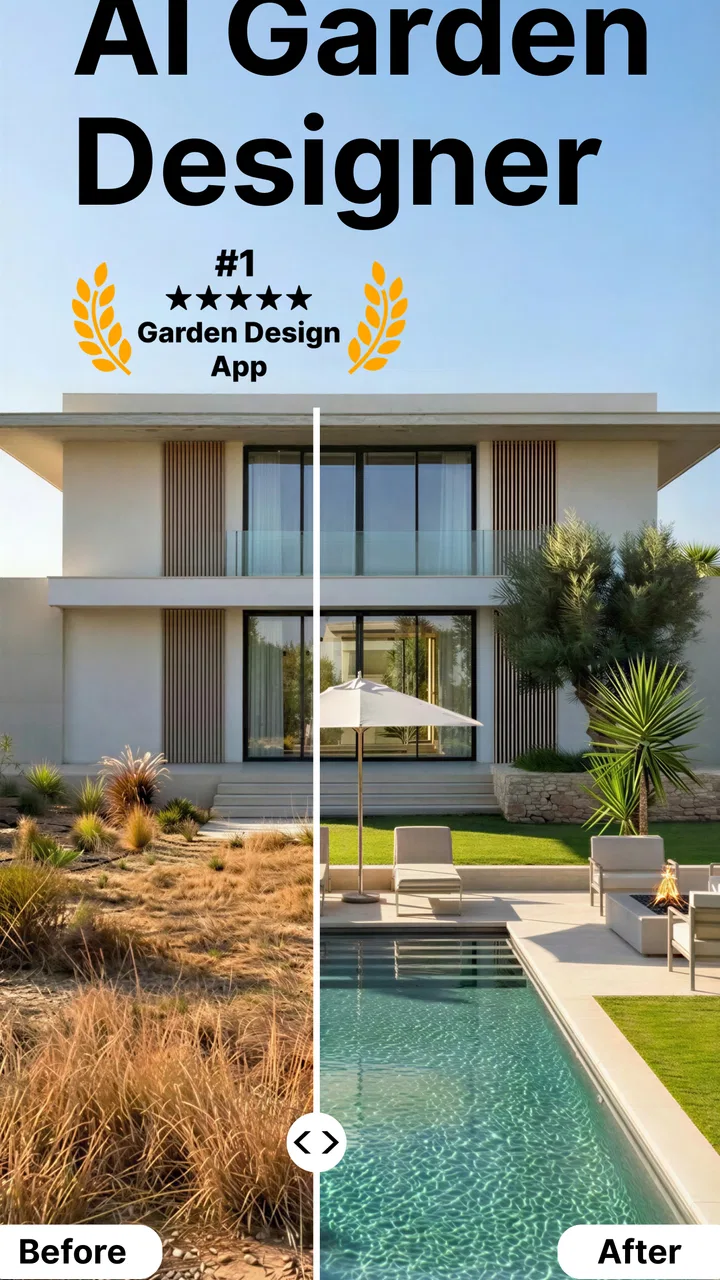
Planning a garden is difficult when you can see the empty space but cannot imagine what it might become. Garden AI - Landscape Design takes a useful approach to that problem: it turns a photo of an outdoor area into a visual starting point for redesign ideas. I found that this is less like a complete landscape-planning system and more like a fast creative sketchbook for yards, patios, balconies, and other exterior spaces.
That distinction matters. The app is not replacing a landscape architect, a measuring tape, or a proper planting plan. Its value is in helping me move past the blank-page problem. Instead of wondering whether a different layout, planting style, or outdoor atmosphere might suit a space, I can use an image-based concept to compare directions quickly. For someone deciding whether to refresh a tired garden, that first visual step can be surprisingly helpful.
Turning an ordinary outdoor photo into a design direction
I like starting with a photo that shows the whole outdoor area, because the way Garden AI reframes an ordinary view can help me choose a design direction before I get lost in small details. In this section, I’ll focus on how to make that first visual comparison more useful, including what to look for when an appealing concept might not fit the space as it really is.
You May Also Like

 Blood Strike: 2.5 Anniversary
Blood Strike’s Loadouts Turn Every Drop Into a Tactical Gamble
A close look at Blood Strike’s custom loadouts: how fast access to signature weapons reshapes its battle royale rhythm, rewards preparation, and narrows the gap between fights.

 Pandora - Music & Podcasts
Pandora’s Music Is Easy to Start, but Harder to Recover
Pandora’s strength is its low-effort path from a seed to a station. Its weak spot is how much confidence it asks you to place in connection, setup, and quiet recovery.

 8 Ball Pool
 Is Built on Rivalries, Rematches, and Routine
A close look at the rivalries, rematches, shared routines, and unanswered safety questions that turn a quick pool match into a persistent mobile community.

 Samsung Music
’s Quiet Strength Is Playing What You Already Own
Its reach comes less from spectacle than from dependable access to a personal library. That simplicity is both the app’s strongest retention engine and its ceiling.

 AccuWeather: Weather Radar
AccuWeather Review: A Quick, Clear Forecast for Everyday Decisions
For everyday plans, the best forecast is the one you can understand quickly. AccuWeather makes rain timing, radar, and local conditions easy to act on, with a few trade-offs.

 Hill Climb Racing
Why Hill Climb Racing Still Turns Crashes Into One More Run
A tiny car, a bumpy hill and one more upgrade: Hill Climb Racing keeps resurfacing because its simple chaos makes every near-miss feel personal.
More From Our News Desk



The capability that makes the app useful
The central idea is simple: use AI to reinterpret an existing outdoor area. The app’s focus on AI garden design makes it different from a traditional drawing tool, where I would need to place every object manually or already understand how to build a convincing composition. Here, the initial creative work comes from the image itself and the style I want to explore.
In practical terms, this means I can begin with a real view of my yard rather than a blank canvas. That makes the result easier to discuss with another person. A vague sentence such as “I want the garden to feel warmer and more organized” becomes more concrete when I can look at a proposed visual direction. Even if the generated result is not the final answer, it gives me something to react to.
I especially like this for early decisions. It can help me decide whether I prefer a more planted appearance, a cleaner outdoor arrangement, or a different overall mood before spending time or money on physical changes. The app therefore works best as a visualization companion, not as a technical construction document.
What the visual approach changes
Many garden-planning alternatives make me think in terms of shapes, grids, plant symbols, or furniture libraries. Those tools can be excellent when I already know the dimensions and want control over every element. Garden AI approaches the problem from the opposite direction. It starts with the atmosphere and appearance of a real place.
That is a meaningful advantage for beginners. I do not need to know the name of every plant or understand professional landscape terminology before exploring an idea. I can look at the image and ask myself a more accessible question: does this feel like the kind of outdoor space I would actually enjoy using?
The trade-off is equally important. A visually appealing result may include arrangements that are hard to build, unsuitable for the local climate, or inconsistent with the available space. I treat every image as a concept, then check the practical details separately. The most useful habit is to separate visual inspiration from construction advice.
How I would use it from the first photo
I would begin with a photo taken in good daylight and from a position that shows the whole area. A cluttered image can make it harder to judge the design because the existing objects compete with the proposed changes. I would also take more than one view if the space has an awkward corner, a slope, or a narrow passage that is not visible from the main angle.
One of the less obvious benefits of this workflow is that the original photo becomes a reference point. I can compare the existing condition with a proposed direction instead of relying on memory. That is particularly useful when discussing the project with a partner or family member who has a different idea of what “modern,” “natural,” or “welcoming” should look like.
I would avoid treating the first generated concept as a verdict. A better process is to create a small set of contrasting directions, study what changes between them, and then identify the elements I genuinely prefer. Sometimes the useful discovery is not the whole image but one idea within it, such as a stronger border, a more open central area, or a better sense of separation between sitting and planting zones.
A realistic everyday scenario
Imagine that I have a small backyard with patchy grass, an old seating area, and a fence that makes the space feel closed in. I am not ready to hire a designer, and I do not want to buy materials before I know what direction makes sense. I could use a clear photo of the yard to explore a few visual approaches, then show the most convincing result to the people who use the space with me.
That conversation becomes more practical. Instead of debating an abstract idea, we can discuss whether we like the amount of open space, whether the seating looks comfortable, and whether the proposed planting feels manageable. I can then make a simple list of questions for a local garden center or professional: which plants suit the conditions, what needs drainage, and what can realistically fit.
This is where the app earns its place. It can shorten the time between “something needs to change” and “we understand the kind of change we want.” It does not finish the project, but it can make the next decision easier.
Where the app is most helpful
For me, the strongest use case is an outdoor area that feels visually disappointing but is not yet clearly planned. A tired patio, a bare side yard, or a neglected garden bed can be difficult to evaluate because I am too used to seeing it as it is. A new visual interpretation helps break that habit.
It is also useful before shopping. I would rather explore a general direction first than collect disconnected pots, lights, plants, and decorations that do not work together. The images can help me establish a priority: perhaps the space needs structure before decoration, or perhaps a small seating change would matter more than adding more plants.
People preparing to sell or rent a property may also find the visual exercise worthwhile, although they should avoid assuming that an attractive concept automatically increases value. The benefit is mainly communication. A prospective buyer or household member may understand the potential of an outdoor area more easily when the idea is shown rather than described.
What I would check before trusting a concept
The first check is scale. AI-generated visuals can make a garden look more spacious or make objects appear better proportioned than they would be in real life. I would compare the concept with the actual walking routes, door openings, storage needs, and places where maintenance equipment must pass.
The second check is suitability. A plant that looks perfect in an image may need a different amount of sunlight, water, soil, or winter protection than the garden can provide. The same applies to materials and furniture. The app can suggest a visual language, but it should not be the only source for decisions involving safety, drainage, structural work, or long-term plant health.
The third check is maintenance. A lush design may look inviting while quietly creating a demanding routine. I would ask how much pruning, watering, cleaning, and seasonal work the concept implies. This is one of the best ways to turn an attractive image into a realistic plan: remove anything I would not consistently maintain.
Trade-offs in the creative workflow
The free price makes the app easy to try, which is a real advantage for casual experimentation. At the same time, in-app purchases range from around four dollars to about fifty dollars per item, so I would pay attention to what is available without spending and what requires a purchase before building a workflow around it. The app is free to install, but that does not mean every creative option is necessarily included at no cost.
I also would not choose it when exact measurements are the main concern. If I need a precise plan for paving, irrigation, retaining walls, accessibility, or a contractor’s quote, a measurement-based design application is a better fit. Those tools may feel slower and less exciting, but they are designed around accuracy rather than instant visual exploration.
There is another subtle limitation: image-based ideas can encourage me to focus on appearance before function. A garden is not only a picture. It is a place for walking, sitting, storing things, handling rain, managing shade, and living with seasonal changes. I found the app most responsible when I used it to generate questions, not when I treated its output as a finished specification.
Who should use it and who may prefer another tool
I would recommend Garden AI to homeowners, renters with outdoor space, beginners, and anyone who has trouble imagining changes from a verbal description. It is particularly approachable for people who do not want to learn a complex design interface before testing a few ideas. The visual starting point keeps the experience focused on discovery.
It is also a good fit for a shared decision. If two people disagree about the direction of a garden, several visual concepts can reveal whether the disagreement is really about style, space, or maintenance. That can save time because the conversation becomes specific. A person who is choosing between a more decorative yard and a more functional one can see the consequences of each direction before committing.
I would skip it as a primary tool if I already have a detailed site survey, a fixed planting list, or a project that depends on engineering-level accuracy. In those cases, a professional service or a precise planning application will provide more dependable information. I would also be cautious if I am looking for a plant-care adviser rather than a design visualizer; those are different needs.
Device fit and basic expectations
The app belongs to the art and design category and is available as a free app for users on Android devices running version seven or later. Its content rating is Everyone, which suits the broad, non-specialist nature of the experience. The current version is 1.1.25, and the developer is FATE YAZILIM VE TEKNOLOJI LIMITED SIRKETI.
Its adoption also suggests that the concept has reached a meaningful audience: it has more than one hundred thousand installs, an average rating of 4.4 from around eight thousand ratings, and 115 written reviews. I would read those figures as a sign that the basic idea is resonating, while still remembering that image-based design is subjective. A result that feels inspiring to one person may feel too decorative or unrealistic to another.
Small techniques that improve the results
My first practical tip is to photograph the space as it is normally used, not only after removing every object. A completely cleared image may look neat, but the everyday obstacles are part of the design problem. Showing the table, bins, toys, or access path can make the visual discussion more honest, even if I later create a cleaner version for inspiration.
My second tip is to compare concepts by function rather than by beauty alone. I would make three short notes for each image: where I would sit, how I would move through the space, and what I would have to maintain. This exposes a common trap in visual design apps: the most attractive concept is not always the one I would enjoy living with.
My third tip is to use the app before visiting a store, then take the concept with me as a conversation aid. I would not ask a retailer to reproduce the image exactly. Instead, I would use it to explain the mood, density, and structure I want, then ask which real plants and materials suit my conditions. That workflow keeps the creative benefit while adding practical local knowledge.
A fourth useful approach is to preserve the original photo and write down what changed in each concept. If the AI shifts the position of a path or makes a boundary disappear, I can identify that as a visual suggestion rather than an accurate representation. This makes it easier to extract the good ideas without accidentally accepting an impossible layout.
My recommendation after using its core idea
Garden AI - Landscape Design is most convincing when I use it as an idea generator for a real outdoor space. Its image-led approach lowers the barrier to experimenting, gives household discussions something concrete to work from, and helps reveal preferences before purchases begin. I appreciate that it can make a neglected or confusing area feel open to possibilities.
I would not use it alone for measurements, plant selection, construction, or cost planning. The visual result needs a reality check involving space, climate, drainage, access, and maintenance. That is not a failure of the app; it is simply the boundary between inspiration and implementation.
For a free art and design app with an Everyone rating, it offers a friendly way to explore a garden’s potential, while the optional purchases mean I would review the available choices before paying. The app has passed one hundred thousand installs and carries a 4.4 average, but my recommendation is based on the workflow itself: if I need help imagining a better yard, I would try it. If I already know exactly what must be built, I would choose a more precise planning method instead.
FAQs for Garden AI - Landscape Design
01What is Garden AI - Landscape Design and what features does it offer?
Garden AI - Landscape Design is an innovative app that helps users design and plan their outdoor spaces using AI technology. Key features include plant identification, personalized garden layouts, and real-time visualizations. It also offers expert gardening tips and the ability to visualize seasonal changes in your garden.
02How user-friendly is Garden AI - Landscape Design for beginners?
Garden AI is designed with user-friendliness in mind, making it suitable for beginners. The app provides a step-by-step guide to help users navigate its features easily. With intuitive drag-and-drop tools and AI recommendations, even those new to gardening can create beautiful landscapes without hassle.
03Does Garden AI - Landscape Design require an internet connection?
While some features of Garden AI, such as plant identification and accessing the latest design suggestions, require an internet connection, many basic functionalities can be used offline. This includes accessing saved designs and utilizing basic design tools, making it convenient for users without constant internet access.
04Is there a cost associated with using Garden AI - Landscape Design?
Garden AI offers a free version with basic features, allowing users to explore its primary functionalities. For advanced features, such as premium plant databases and enhanced design tools, a subscription model is available. This flexible pricing allows users to choose the level of service that suits their needs.
05Can Garden AI - Landscape Design be integrated with other smart garden devices?
Yes, Garden AI supports integration with various smart garden devices, enhancing the gardening experience. By connecting with compatible devices, users can automate watering schedules, monitor soil conditions, and receive alerts, further optimizing their garden's health and growth.
Pros
- Intuitive user interface for easy navigation.
- Extensive plant database for accurate planning.
- Real-time AR visualization of designs.
- Customizable templates for varied landscapes.
- Regular updates with new design features.
Cons
- Requires a stable internet connection.
- Can be resource-intensive on older devices.
- Limited free features; subscription needed.
- AR feature may struggle in low light.
- Initial setup can be time-consuming.

Garden AI - Landscape Design
Gallery